1. Identify the store and its advertiser pages
Start with the store domain and official profiles linked from its website. Search each page in the Meta library and select the relevant country and status. Confirm that the ads lead to the right domain.
A store can use several pages, and one page can promote several destinations. Similar names alone are not enough to connect businesses. Record confirmed pages separately from uncertain matches.
2. Count ads, not cartões or unique creatives
Use ad identifiers where available to avoid duplicating records in your list. One video may appear in multiple ads, and a card may present variations. Decide whether your measure is ads or distinct creatives.
Keep the scope consistent: active ads in the same market observed on the same date. Counts can change with filters and updates. See the Ad Library guide for search instructions.
3. Review ads associated with the domain
Ads Bench public store pages bring together ads associated with an identified domain. Open a profile such as zenamakeup.com to see the available fields.
The screenshot shows 7,340 active ads, 16,851 tracked ads and three advertisers. It is a captured example, not a guaranteed current count. Coverage depends on collected ads, destination matching and status updates.

4. Separate active, inactive and new ads
Active ads are marked active in the available observation. Inactive ads are known records no longer in that state. New ads describe the launch or detection metric shown for the period; check its definition and update date.
A high inactive-to-active ratio does not prove that a store found profitable ads. It may reflect ended promotions, testing or a longer collection history. A small inactive count may simply reflect recent coverage.

5. Compare changes over consistent periods
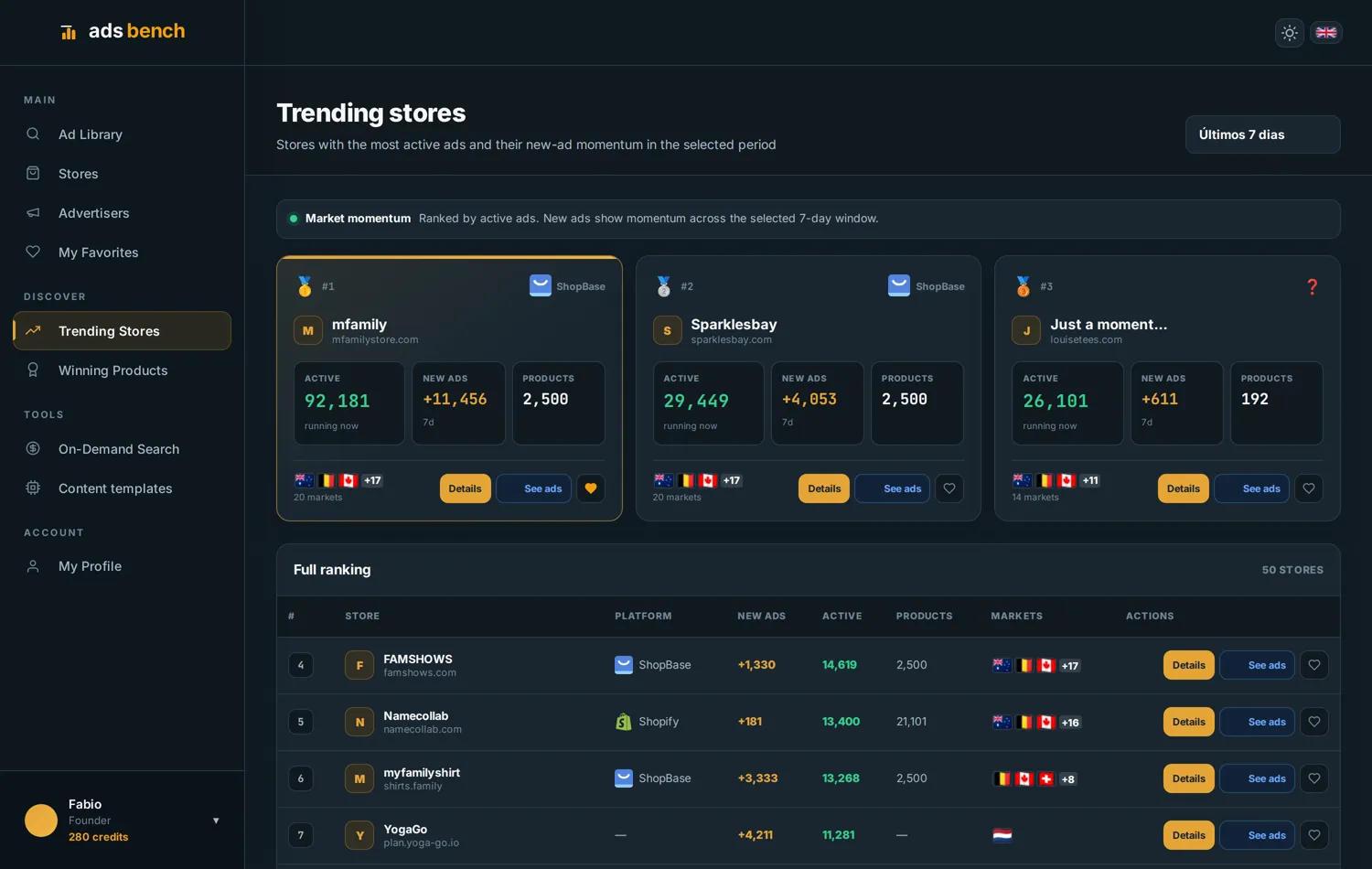
The trending-store view helps compare recent activity. Use the same window, such as seven days, and record another observation the following week. Compare creative and offer diversity as well.
If a store launches many new ads, investigate what changed. Usually, a store that multiplies its ads is increasing spend because sales are paying for it: few stores scale what loses money. Just check that it is not a seasonal campaign, an expansion to other countries or a round of testing.
How to use ad counts for competitor research
Choose stores with comparable products and markets. Use volume to prioritise further research, then inspect the offer and creative. Platforms, prices and catalogues help separate direct competitors from businesses unlike yours.
For product selection, continue with the product research guide. To assess a store’s fulfilment model, read the signs and limits of identifying dropshipping.
Ad count FAQs
Why do Meta and Ads Bench show different totals? They may use different scopes: page versus domain, markets, statuses, collection dates and coverage. Align those factors before comparing.
Can I calculate spend from the number of ads? No. Ad counts do not reveal budgets or how spend is distributed. Multiplying ads by an arbitrary daily amount gives an unsupported estimate.
Does zero ads mean a store is closed? No. It may advertise through other pages, markets or channels, or temporarily have no ads visible in your search.
Examples: Ads Bench screenshots from 7-8 September 2026. Figures illustrate the interface and may change; coverage does not represent the whole market.